What an encoder does, what it does not, and what ours does differently.
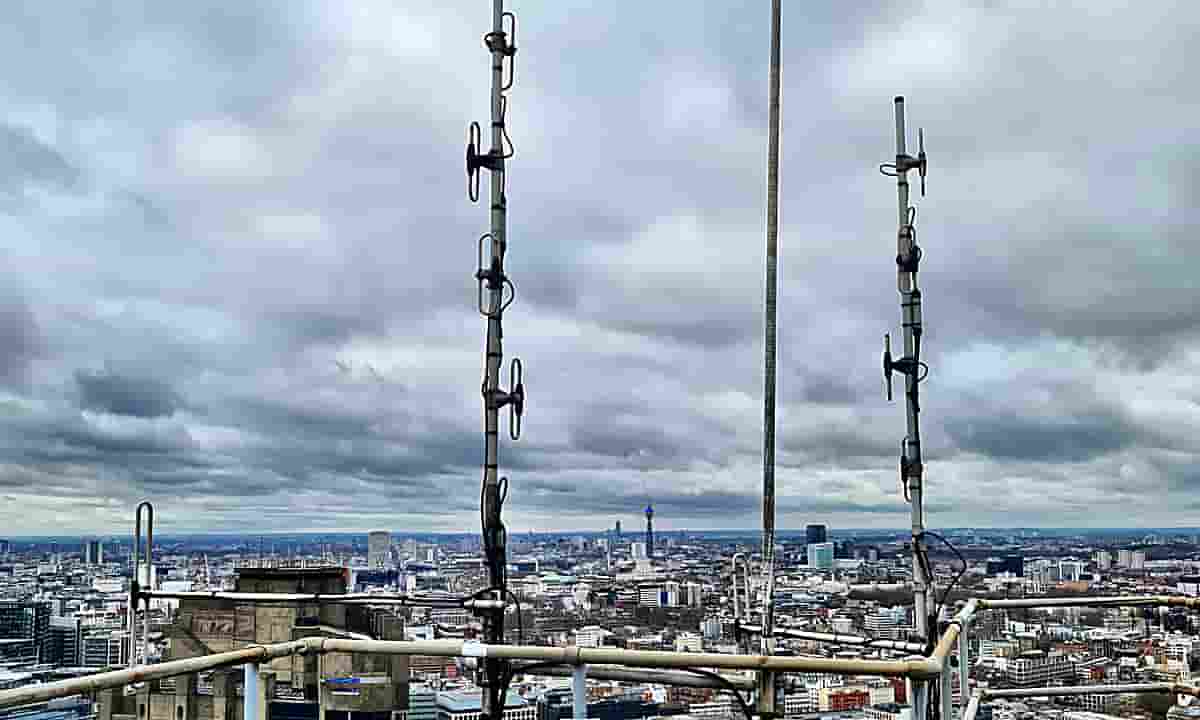
An encoder does not make your station sound punchy, warm, bright or loud. Those things come from your studio and your processor, and they arrive at the encoder already decided. An encoder cannot add punch that was never sent to it, and it cannot take punch away.
What an encoder decides is how much of your sound survives the journey to the listener at the bitrate you are paying for. Every DAB+ service discards most of its audio data – that is what coding at 32 or 48 kbps means – and the entire difference between encoders lies in what they choose to keep and how much damage the discarding does.
Most people can hear it long before they can name it. Three words cover most of what a struggling encoder does to music.
Watery. Cymbals and hi-hats lose their edge and wash out, and sustained sounds take on a faintly underwater quality. This is the lower and middle of the spectrum running short of bits.
Grainy. A rough, raspy texture on anything with fine detail in it – strings, brass, breath, the tail of a reverb. This is the sound of coarse quantisation.
Metallic. A hard, fizzy edge on the top end that comes and goes with the music. This one has a specific cause, explained further down this page, and it is the artefact we hear most clearly when comparing encoders.
None of the three can be produced by a processor, and none can be confused with a reception fault. If you want a ten-second test on your own output, listen to applause. On a struggling encoder a crowd stops sounding like hands and starts sounding like rain.
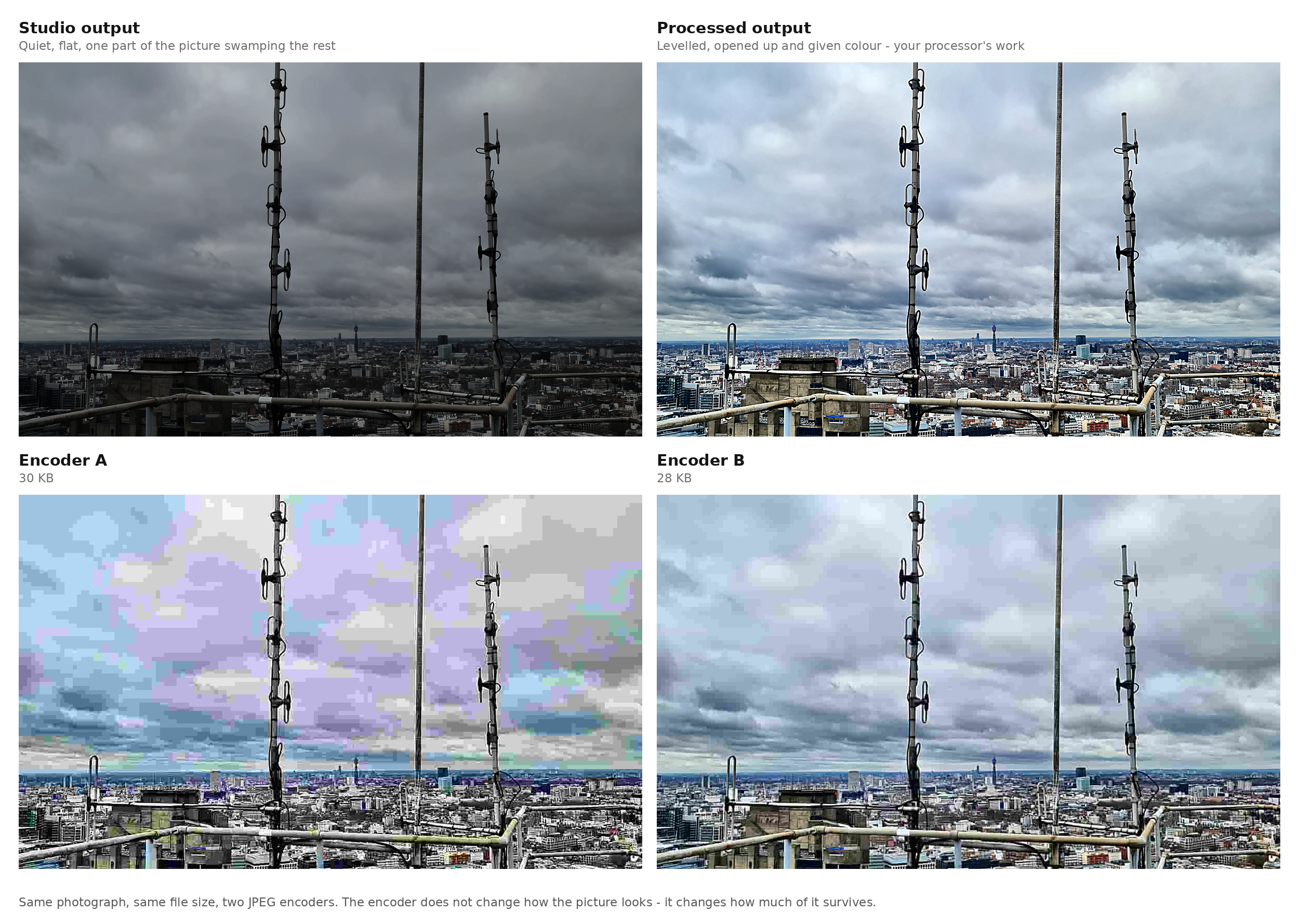
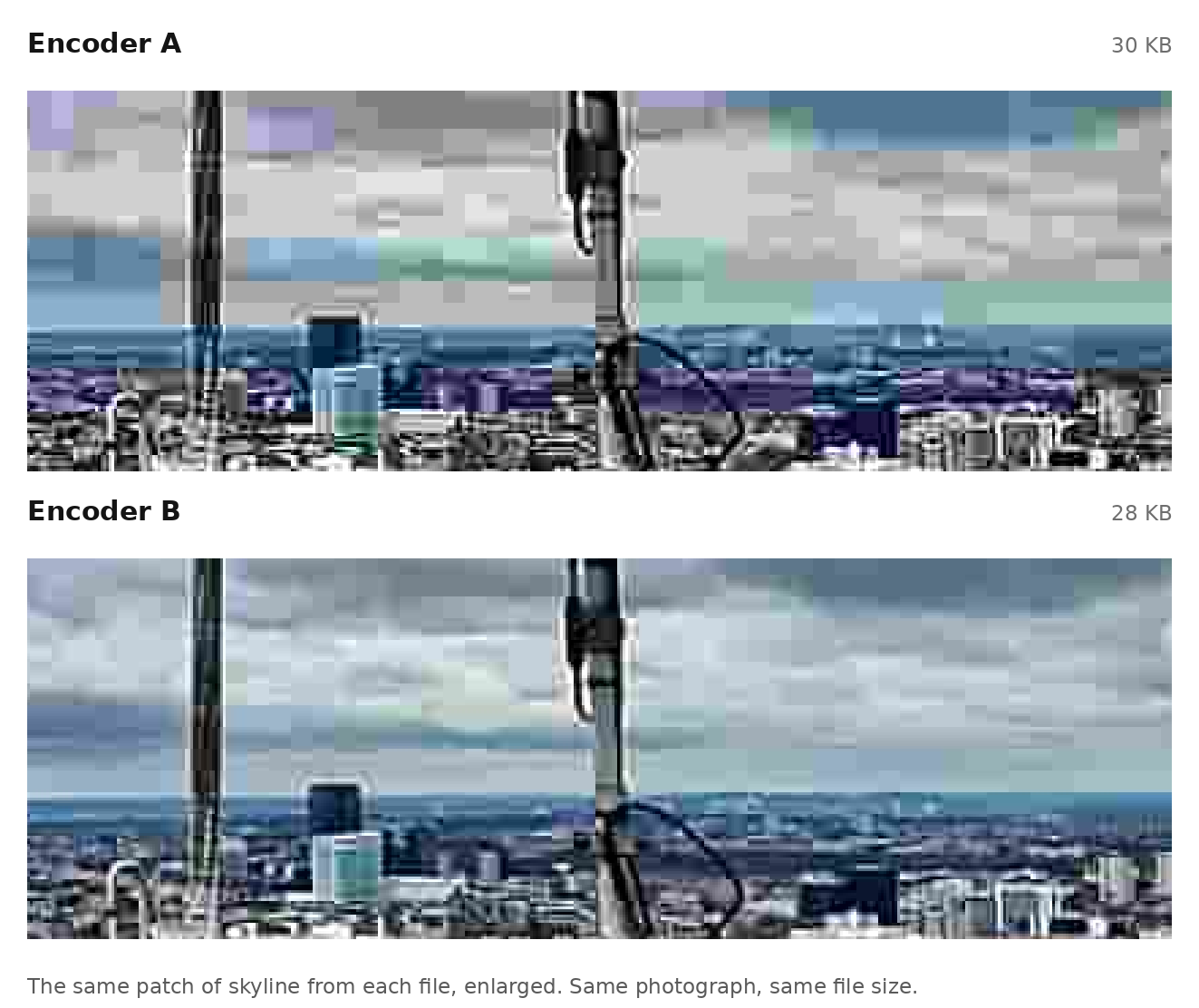
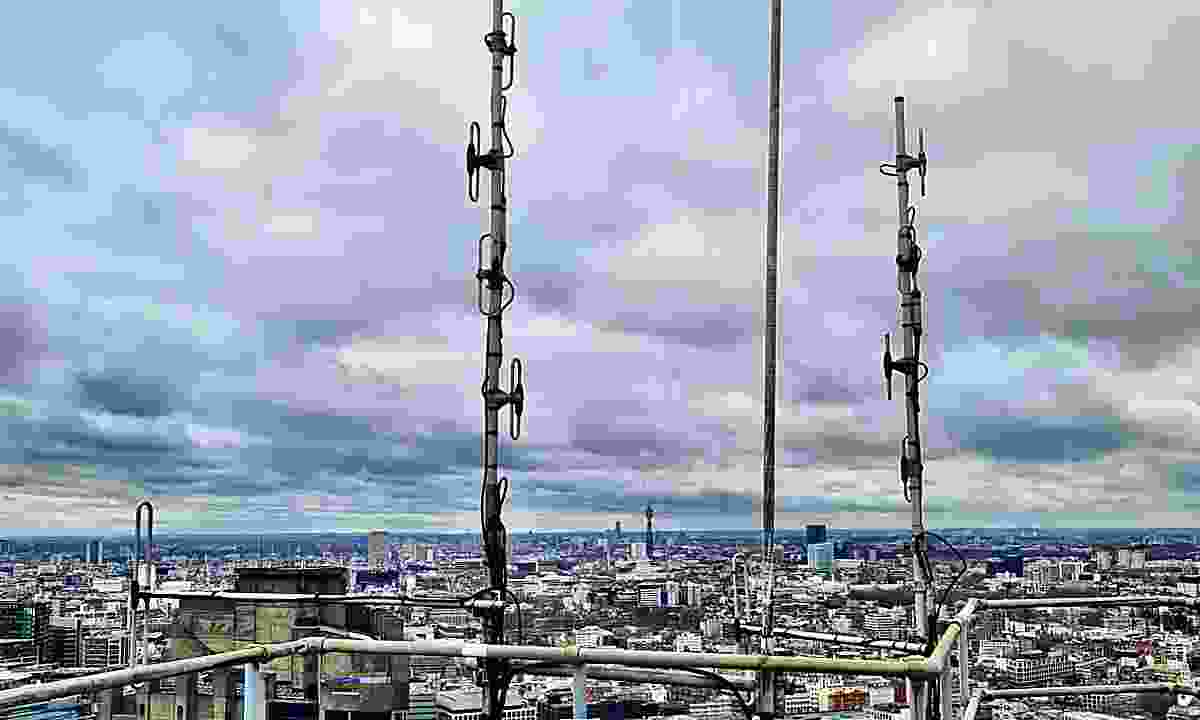
Pictures are compressed in much the same way as audio, and the same rules apply. Here is one of our own photographs, taken from the roof of one of our London sites.
The first two panels are the processor’s work. Quiet and flat, then brought to life – and nothing an encoder does will change which of those two a listener hears.
The bottom two are the encoders. Both files are the same photograph at the same file size, around 30 KB. One was compressed by a lightweight JPEG encoder built for limited processing power, the other by the best JPEG encoder available today. Neither has changed the colours, the brightness or the framing. What differs is how much of the picture survived.
Encoder A 30,603 bytes Encoder B 29,120 bytes
At a glance, on a phone screen on a moving train, both are perfectly acceptable. That is worth saying plainly: in a car at 70mph with road noise, you would not pick between them either. This is not a difference that ruins your station.
But look properly, on a decent screen, sitting still, and the gap opens up.
Blocks in the sky, colours bleeding into one another, buildings collapsing into mush. Once you have seen it, you cannot stop seeing it.
Audio behaves in exactly the same way. On a kitchen radio while the kettle boils, the difference between encoders is easy to miss. In a quiet electric car driving slowly through a city, or at home in the evening, or on headphones, it is the difference between a station someone listens to and a station they listen through.
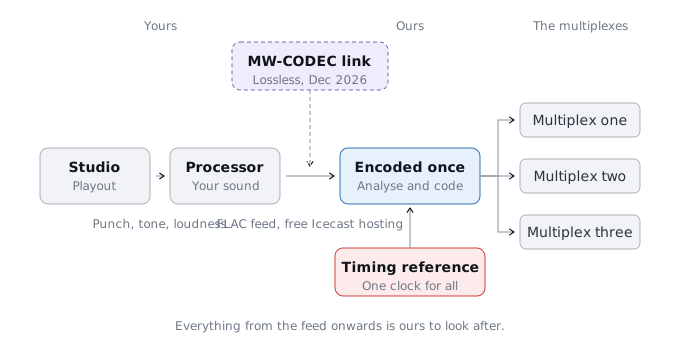
You send us your audio once. We do everything else.
Your playout sends a single stream to us. That can be your station’s existing internet stream, or an Icecast contribution mountpoint we host for you free of charge. The free mountpoint matters more than it sounds: many streaming providers charge extra for additional mountpoints, so stations often end up feeding their encoder from the same 128 kbps MP3 stream their listeners hear, simply because a second, better feed would cost money. Ours costs nothing, so your contribution feed can be as good as your connection allows.
Our encoder analyses that feed, encodes it, and delivers it by EDI to every multiplex that carries you, all from one timestamped source. Everything from the contribution feed onwards is ours to look after – the encoding, the text and slides, the delivery, and the monitoring that tells us about a problem before your listeners hear one.
We recommend FLAC, at 48 kHz stereo. That is your audio exactly as it left your playout, with nothing discarded before we start work.
Most encoding services will not take it. They pass incoming audio through general-purpose tools such as VLC or GStreamer, built for playback rather than for continuous unattended broadcast, and a long-running FLAC stream is where that shows: the decode loses synchronisation, the audio garbles or stops, and the usual answer is to ask the station for MP3 instead.
We do not use either. Our stream decoder is our own, integrated directly into the encoder and designed for a feed that has to run for months without anyone touching it. It recovers cleanly from the conditions that break general-purpose players.
If lossless is not practical for your connection, MP3 at 320 kbps is absolutely fine and plenty of our stations use it. The difference is small once the audio has been coded for broadcast. We would simply rather start from the best you can send.
Coming in December 2026: our own studio-to-transmitter link software for Windows, carrying your audio at 768 kbps using the MW-CODEC, and removing the last coding stage from the chain entirely.
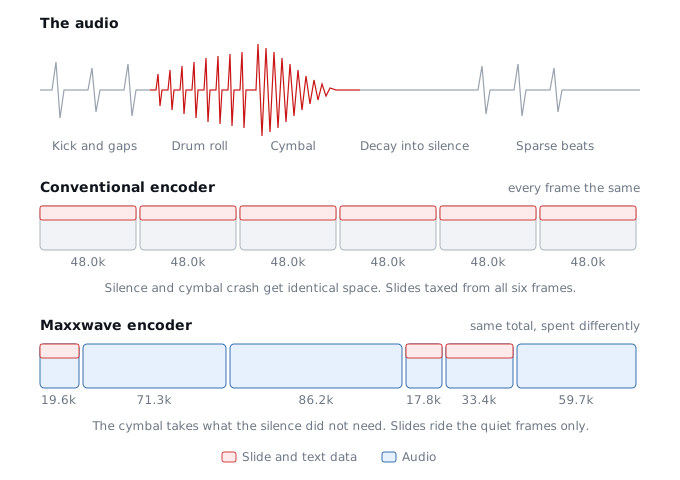
FDK-AAC encodes each small frame of data as it arrives, deciding how to spend the bits within that frame without knowing what is coming next. It is fast, and it is the only approach that works on limited hardware.
Ours analyses a complete superframe first – up to six frames – works out which parts are difficult, and only then encodes. The capacity goes to the moments that need it and is taken from the moments that do not. A cymbal crash and a held vowel get very different treatment.
The peak rates you can see are perfectly normal: a single frame can borrow well above the nominal rate for a moment, funded by the frames either side, and the superframe total never changes. What matters is that the bits go where the audio is.
We have monitored over 100 UK small-scale, regional and national DAB multiplexes off air. Not one of them varies its bit allocation within the superframe. Every frame gets the same share whatever the audio is doing. You can check this yourself in a few minutes with the etisnoop tool.
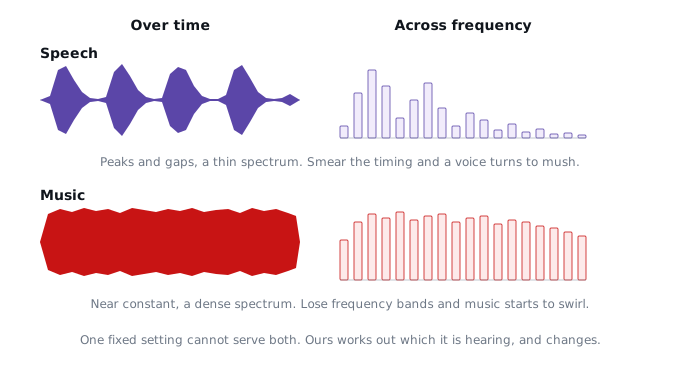
Speech and music need to be encoded in completely different ways. What makes a voice sound natural and what makes music sound rich are not the same thing, and the choices that serve one work against the other. A single fixed setting cannot do both.
FDK-AAC settles this by leaning towards speech, and that is a defensible choice: the ear is far less forgiving of distortion in a voice than in music. But the consequence is that music is not encoded as well as it could be. Not through carelessness – the encoder simply has no way of knowing which it is listening to, so it has to assume the more demanding case at every moment of the day. If your station is music-led, that compromise is being paid by your output around the clock.
This is a recognised limitation of the AAC used for DAB+ rather than an opinion of ours – the technical page explains why MPEG built an entire speech codec into the newer xHE-AAC to solve it, and why DAB+ radios cannot use it.
We had no such constraint. Ours listens to what it is encoding and changes its approach as your programming changes. Your presenters are encoded using tools optimised for speech. Your music is encoded using tools optimised for music. There is nothing for you to set.
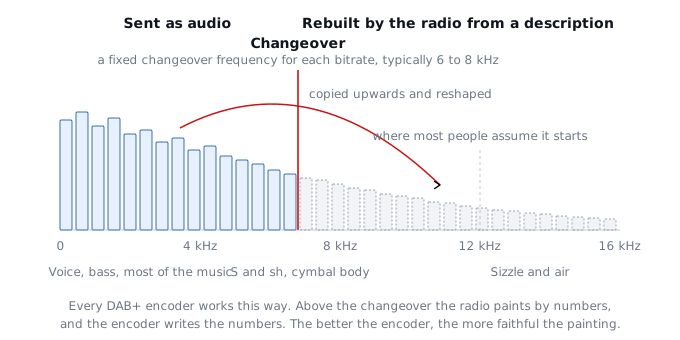
At DAB+ bitrates there is not enough capacity to send the whole of the sound as audio. Every DAB+ encoder solves this in the same way, using a tool built into the standard called spectral band replication.
Below a fixed changeover frequency – typically somewhere between 6 and 8 kHz, depending on the bitrate – the audio is sent as audio. Above it, the encoder sends only a short description: a handful of numbers per frame describing the shape and character of the top end. The radio then paints the top end in from that description, copying the lower band upwards and reshaping it to fit.
Two things about this surprise most people. The first is where the line sits. It is not the top octave that gets painted in; it is everything above six to eight kilohertz, which includes the consonants that make speech sound clear and the body of every cymbal. The second is how much of the result depends on the description. The radio paints faithfully from good numbers and badly from rough ones, and a rough painting of the top end is exactly what metallic sounds like.
Every DAB+ encoder works this way. The better the encoder, the more faithful the painting. Which raises the obvious question: how does an encoder know its description is right before it sends it?
It decodes the painting and looks at it.
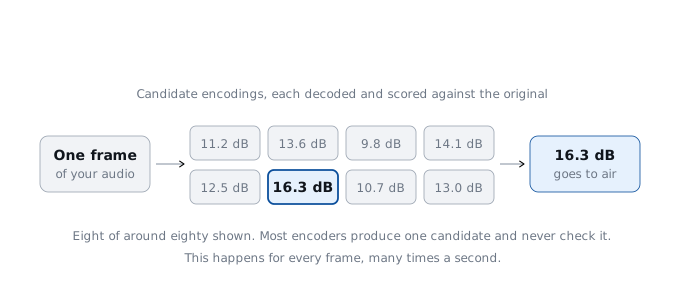
Most encoders write the description, send it, and never find out what the radio made of it. Checking would mean decoding your own output and comparing it against the original, and that considerably increases the processing load – so on hardware built for speed it is left out.
Ours does it for every frame. It produces a set of candidate encodings, decodes each one exactly as a receiver would, measures how closely each reconstruction matches your original audio, and sends only the winner. It is doing, automatically and hundreds of times a second, what an engineer does when they listen back to a recording. This is the correct closed-loop method, and it is the single biggest reason our top end does not sound metallic.
At 40 kbps and below, carrying two independent channels stops making sense. Splitting 40 kbps into 20 kbps per channel produces artefacts far more damaging than any benefit the stereo width could add, so services would have to either go mono or carry a heavily compromised audio stream.
Parametric stereo is the answer the standard provides: one high quality mono signal, plus a compact description of the stereo image that the receiver uses to rebuild the width. Every DAB+ radio supports it. How convincing it sounds depends entirely on how accurately the encoder measures and describes that image, and measuring it accurately is expensive.
We spend a great deal of processing on getting that description right, and on making sure what we send is decoded reliably by the receivers people actually own rather than only by the best of them. The result is convincing stereo from 24 kbps upwards – rates at which stereo is normally either absent or not worth having. The quality rating from stereo at 24 kbps using our encoder is consistently and clearly higher than running mono. Our parametric stereo uses heavily optimised profiles and techniques that are not seen on FDK-AAC.
Station text and slideshow images travel inside the same data as your audio. Conventional encoders take a fixed slice out of every single frame to carry them, whether the audio can spare it or not – including during the loudest and most complex passages, where the audio is already short of bits. Once headers, framing and checksums are counted, that can be 30 per cent of the bits that should have been your audio.
Ours sends that data through the quiet moments instead: the pauses, the fades, the simple passages. Your text and images arrive just as reliably. They simply stop being paid for out of your audio at the moments that matter. At 32 kbps and above you cannot tell whether images are running or not.
Before an encoder can decide what to keep, it has to analyse your audio, and that analysis takes hundreds of calculations for every fraction of a second.
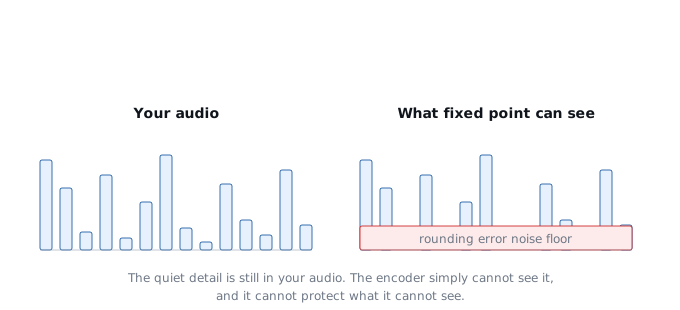
FDK-AAC does that arithmetic in fixed point, which is fast and runs on almost any processor, and which rounds at every step. Round once and it makes no difference. Round several hundred times, as the transforms at the heart of AAC encoding require, and the errors accumulate into a noise floor on the analysis itself. Anything quieter than that floor is invisible to the encoder, and an encoder cannot protect detail it cannot see.
Anyone who used cassette noise reduction will remember what happens when it mistracks: the hiss stops being steady and starts moving with the music, swelling under loud passages and falling away in the quiet ones. The encoder’s picture of your audio behaves in much the same way. It is not noise on your output, but it is noise on the picture the encoder is working from, and every decision it makes is made from that picture.
Ours works in true floating point throughout. Quiet detail sitting alongside loud material stays visible, and stays protected. It would be reasonable to expect this to matter only at higher bitrates, above 128 kbps or so. We have found it produces a very tangible improvement at every bitrate, in different ways.
If you are carried on more than one multiplex, your listeners are hearing several different encoders, each making its own decisions and each drifting independently. Drive between coverage areas and you hear it: the audio jumps, skips and changes character.
It causes a second problem that is less obvious. Some car receivers compare the audio before handing over between multiplexes, and where the two do not match closely enough they hold on to the weaker signal far longer than they should – often until it starts breaking up, rather than switching when the stronger multiplex becomes available.
We encode your station once and feed every multiplex from the same timestamped source. Drive from one area into the next and nothing changes. Even where your bitrates differ between multiplexes, the audio stays in step – and receivers hand over when they should.